blend mode is a way to blend pixels from two different images to get a different effect, however that one form of blending there are may other ways of blending an image and how the pixels can change. That can be achieved by using multiply, dissolve, colour burn, screen, overlay, etc.
I got my understanding of what a blending mode means on Photoshop is through this website: down below.
https://helpx.adobe.com/uk/photoshop/using/blending-modes.html
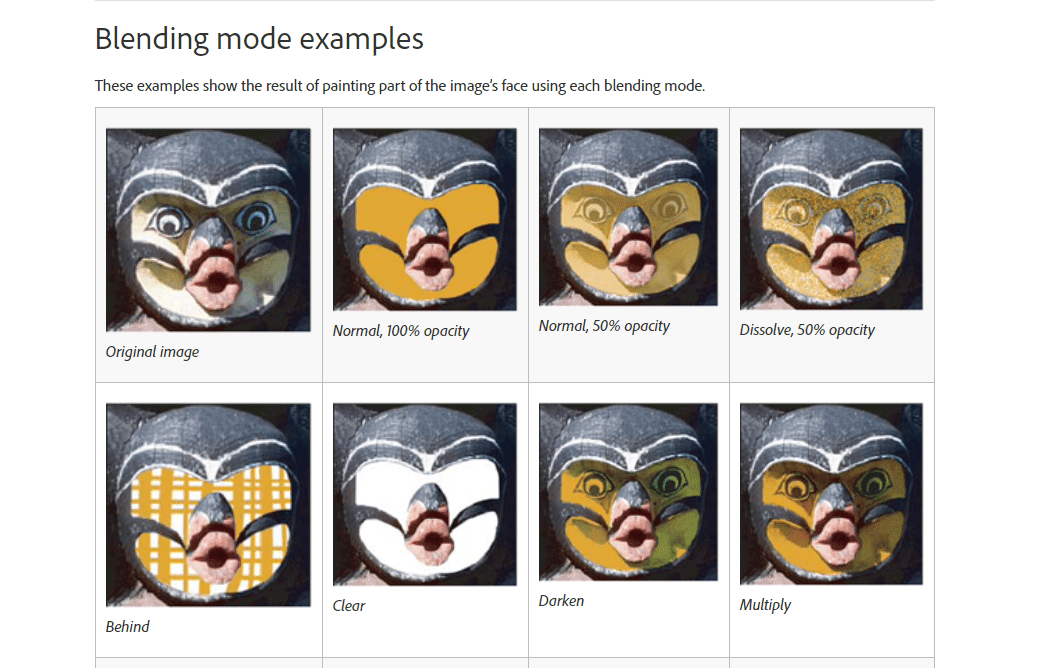
I have took this picture from the website that is listed above and it shows you the different forms of using a blending mode on Photoshop. The image demonstrates how the original picture can be changed by using some of the blending modes, i.e. the multiply tool would look at the information of the colour in each channel and then multiplies the base color by the blend color.
 Nav's Game Design